Make tech troubles… less troubling.
TSG V3.01 guides you through Linux, Windows, and macOS issues with clear, skill-aware steps, plus OS-specific tips, categories, and command helpers.
Your saved tips

How TSG wants to help
From “I’m stuck” to “it works again” in as few decisions as possible, with explanations at your pace.
🧭 1. Choose your OS & comfort level
🤝 2. Mix human judgment with AI guidance
TSG follows a hybrid model:
- You choose what runs on your system.
- TSG suggests commands and explanations you can review first.
- Nothing runs without your explicit decision.
- Whenever possible, steps are explained, with hints on where to learn more.
Trusted resources & best practices
TSG doesn’t replace the great communities out there—it helps you use them better.
🌐 Helpful communities & docs
- SuperUser – power user Q&A
- Stack Overflow – developer questions
- Tom’s Hardware – hardware troubleshooting
- Arch Wiki – deep Linux knowledge
- AskUbuntu – Ubuntu-focused Q&A
- Apple Discussions – macOS & hardware
- Microsoft Learn – Windows official docs
🔐 Security principles TSG follows
- Prefer read-only diagnostics first, repairs second.
- Encourage backups before big changes.
- Minimize commands that require admin/root unless clearly needed.
- Explain what a command does—especially if it touches the network or kernel.
- Favor official package managers and reputable sources.
🎨 Image prompt lab
Prompt Forge helps you build prompts for NightCafe, SDXL, Stable Diffusion, and more with guided choices for style, subject, scene, mood, lighting, and detail.
You can still roll random combinations, tweak them, and copy prompts into your favorite model.
➡️ Open Prompt Forge
Local path (dev / desktop use):
TSG-prompt-forge.html
I helped create this, i could help you too ?
Contact & feedback
Ideas for better flows? A favorite trick you use on your own machines? TSG improves when you share what works.
📩 Get in touch
Questions or feedback? Email: 45dgof8@gmail.com
Home base: 45dgof8.com
If you’d like to support development: paypal.me/45dgof8
📣 What you can tell TSG
- What’s the most annoying support task you still do manually?
- Which OS do you want more tips or flows for?
- What kind of explanations feel best to you (short, long, visual)?
- Any favorite commands we should add to the feeds?
Example Dialogue with TSG
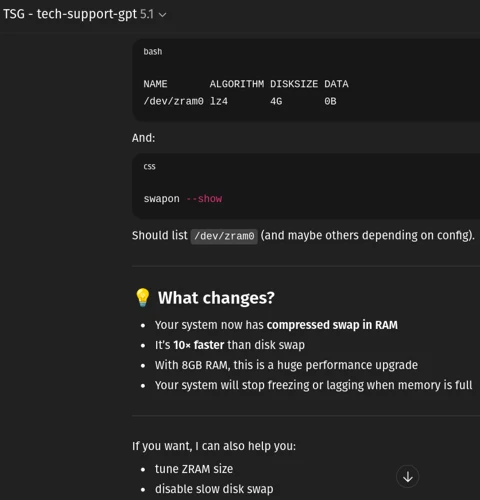
A real example of TSG in action — your personal tech support GPT.